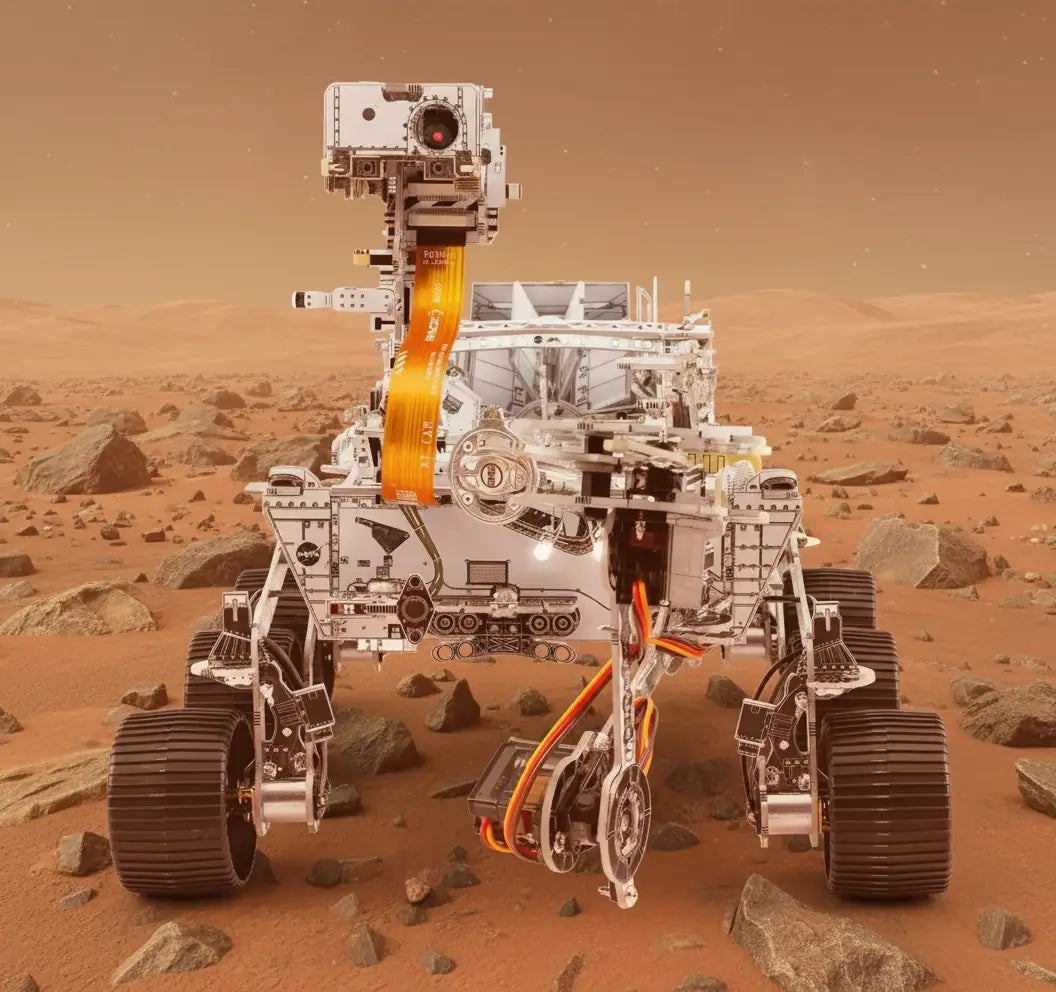
Build Your Own Mars Rover Kit: The Ultimate Weekend Project for Space Fans
Share
Ready for Liftoff: Your DIY Mars Rover Adventure Begins!
Ever watched those NASA livestreams of rovers cruising across the red planet and thought, "I wish I could build one of those"? Well, cosmic dreamers and garage tinkerers, your wish has officially been granted! Our DIY Mars Rover Kit brings the thrill of interplanetary exploration right to your kitchen table, no rocket science degree required.
This isn't just another weekend project that ends up collecting dust in your closet. This is your personal ticket to the red planet, a hands-on adventure that combines the coolness of space exploration with the satisfaction of building something awesome with your own two hands. Whether you're shopping for a science-obsessed kid or looking to unleash your inner space engineer, this project delivers astronomical fun without the billion-dollar NASA budget.
So grab your cosmic tool belt and prepare for liftoff. We're about to transform your Saturday from ordinary to extraterrestrial with a project that's equal parts educational brainteaser and ridiculously entertaining challenge!
What's In Your DIY Mars Rover Kit: Mission-Critical Components
Opening your DIY Mars Rover Kit feels like Christmas morning for space nerds (and we mean that as the highest compliment). Let's inventory the galactic goodies you'll find inside:
-
Rover chassis and wheels: Specially designed with treads that can handle the "Martian terrain" of your backyard or living room carpet
-
Motors and battery pack: The powerhouse that brings your mechanical explorer to life
-
Microcontroller brain: The command center where all the robotic magic happens
-
Sensors galore: Including distance sensors, light sensors, and even a mini camera option for the premium kits
-
LED lights: Because even robot explorers need their bling
-
Assembly tools: Everything you need except your enthusiasm (you'll need to supply that yourself!)
-
Step-by-step instruction manual: Written by humans, for humans, with actual comprehensible directions
Each component has been selected to give you that perfect balance between authentic rover functionality and "I can actually build this without losing my mind" simplicity. The parts snap and screw together with satisfying precision, making this accessible for beginners while still offering enough complexity to keep experienced makers engaged.
From Parts to Planetary Explorer: Assembly Basics
Transforming your pile of parts into a functioning Mars rover happens in stages, each more exciting than the last:
-
Chassis construction: Start with the rover's backbone, connecting the main frame pieces to create your explorer's sturdy foundation.
-
Wheel assembly: Attach those chunky, terrain-conquering wheels that give your rover its distinctive Mars-ready stance.
-
Electronics installation: This is where things get interesting! Mount the motors, connect the battery pack, and position the microcontroller brain.
-
Sensor placement: Carefully attach each sensor in its designated spot, giving your rover the ability to "see" and "feel" its environment.
-
Final connections: Wire everything together following the color-coded guide (we made this part super straightforward, promise!).
The entire assembly process takes about 3-4 hours for most builders, though we've seen excited kids knock it out in 2 hours flat (while their parents were still reading the introduction). Take your time and enjoy the process. Each connection brings you one step closer to commanding your very own Mars mission!
Building Your Rover: A Step-by-Step Cosmic Journey
Now that you know what you're working with, let's break down the assembly process into manageable mission phases:
Phase 1: Mechanical Assembly Start by connecting the chassis components using the provided screws and brackets. This creates the skeleton of your rover. Next, attach the wheel assemblies, making sure they're securely fastened but can still rotate freely. The suspension system might look tricky, but follow the diagrams and you'll be surprised how intuitively it comes together.
Phase 2: Power Systems Install the battery compartment and connect the power distribution board. This is your rover's heart, pumping electrical energy to all its systems. Make sure to double-check your connections here, as proper power flow is essential for your rover's success.
Phase 3: Brain Installation Mount the microcontroller in its designated position and begin connecting the various electronic components. Each wire has a specific home, color-coded for your convenience. This is where your rover starts to look less like a pile of parts and more like something NASA might have designed!
Phase 4: Sensor Array Attach each sensor according to the diagram, taking care to position them at the correct angles. The distance sensors need clear pathways to detect obstacles, while the light sensors should have an unobstructed view upward.
Phase 5: Final Connections and Testing Connect the remaining wires, double-check all your connections, and insert the batteries. Time for the moment of truth! Power up your rover and watch for the indicator lights that show your systems are online and functioning.
Troubleshooting Tips for Rookie Space Engineers
Even NASA has launch delays, so don't worry if your rover doesn't spring to life immediately. Here are some common issues and their quick fixes:
-
Rover won't power on: Check battery orientation and connection points. The number one culprit is usually batteries installed backward or loose connections.
-
Wheels spin but rover doesn't move: Look for something obstructing the wheels or gears. Sometimes a stray wire can get caught in the mechanism.
-
Sensors not responding: Verify all sensor connections are secure and that nothing is blocking their view. Sometimes a tiny piece of packaging material can obstruct a sensor.
-
Erratic movement: This usually indicates a loose connection somewhere in the motor wiring. Retrace your steps through the motor installation section.
-
Programming errors: If using the app to control your rover, ensure your device's Bluetooth is enabled and you're within range. Sometimes simply restarting the app solves mysterious glitches.
Remember, troubleshooting isn't failure, it's part of the engineering process! Each problem you solve makes you more familiar with how your rover works, turning you into a more capable space engineer.
Take Your Mars Rover to the Next Level: Customization Station
Once your basic rover is up and running, the real fun begins! Here's how to transform your standard explorer into a personalized space machine:
-
Terrain modifications: Add larger wheels or extended treads to help your rover tackle more challenging landscapes.
-
Sensor upgrades: The basic kit includes essential sensors, but you can add temperature sensors, humidity detectors, or even a basic soil analysis tool.
-
Custom body panels: Design and 3D print (or even craft from cardboard) unique body panels that give your rover its own personality.
-
Solar panel addition: For the environmentally conscious explorer, add a small solar panel to supplement battery power.
-
Sample collection arm: Design a simple mechanical arm that can pick up small objects, just like the real Mars rovers do!
The beauty of this kit is its expandability. The base microcontroller has plenty of extra ports for additional components, making your rover as upgradeable as your imagination allows.
Programming Challenges That'll Blow Your Mind
If you're ready to graduate from manual control to autonomous exploration, these programming challenges will take your rover experience to interstellar levels:
-
Obstacle course navigation: Program your rover to navigate through a homemade obstacle course without any human intervention.
-
Light-following behavior: Create code that makes your rover follow a flashlight beam, just like a curious space pet.
-
Mapping mission: Have your rover explore a room and create a basic map of the layout using its distance sensors.
-
Sample identification: Program your rover to identify different "samples" (colored objects) and sort them by color.
-
Dance routine: Who says science can't be fun? Program a choreographed dance routine for your rover, complete with LED light show.
The companion app includes tutorials for these challenges, with code snippets you can modify and expand. Even if you've never programmed before, the block-based coding interface makes it surprisingly intuitive to teach your rover new tricks.
Mission Accomplished: Your Space Exploration Journey Continues!
You've just built your very own Mars Rover, and that's no small feat! This isn't just another toy collecting dust on your shelf. It's your personal window into the fascinating world of space robotics, a conversation starter that showcases your maker skills, and a brain-boosting project that secretly taught you about electronics, programming, and mechanical engineering.
Whether it's proudly displayed on your desk, roaming the "alien terrain" of your backyard, or the star of your next science fair project, your DIY Mars Rover represents something amazing: your ability to bring a piece of space exploration right into your home.
The journey doesn't end here, though. The skills you've developed building your rover transfer to countless other projects. You've gained confidence in working with electronics, basic programming concepts, and mechanical assembly. Who knows? Maybe the engineer who builds the next actual Mars rover is reading this right now, inspired by their first DIY kit!
Ready to take the next giant leap? Check out our other science kits that'll keep your curiosity soaring to new heights. From DIY weather stations to programmable robot arms, there's a whole universe of cool projects waiting for your newly-discovered maker skills!
Remember, space exploration isn't just for billion-dollar agencies anymore. It starts right here, with curious minds like yours and projects that bring the wonders of the cosmos into everyday life. Happy exploring, space cadet!